

Make the invoice. Get back to work.
An iPhone app for solo service businesses. Create a professional invoice or estimate in under a minute and send it before you leave the job — no accounting system required.
First five sends free, then $5.99/mo or $49.99/yr
No monthly invoice counter. No cut of what your customers pay you. No account — your records live on your phone.
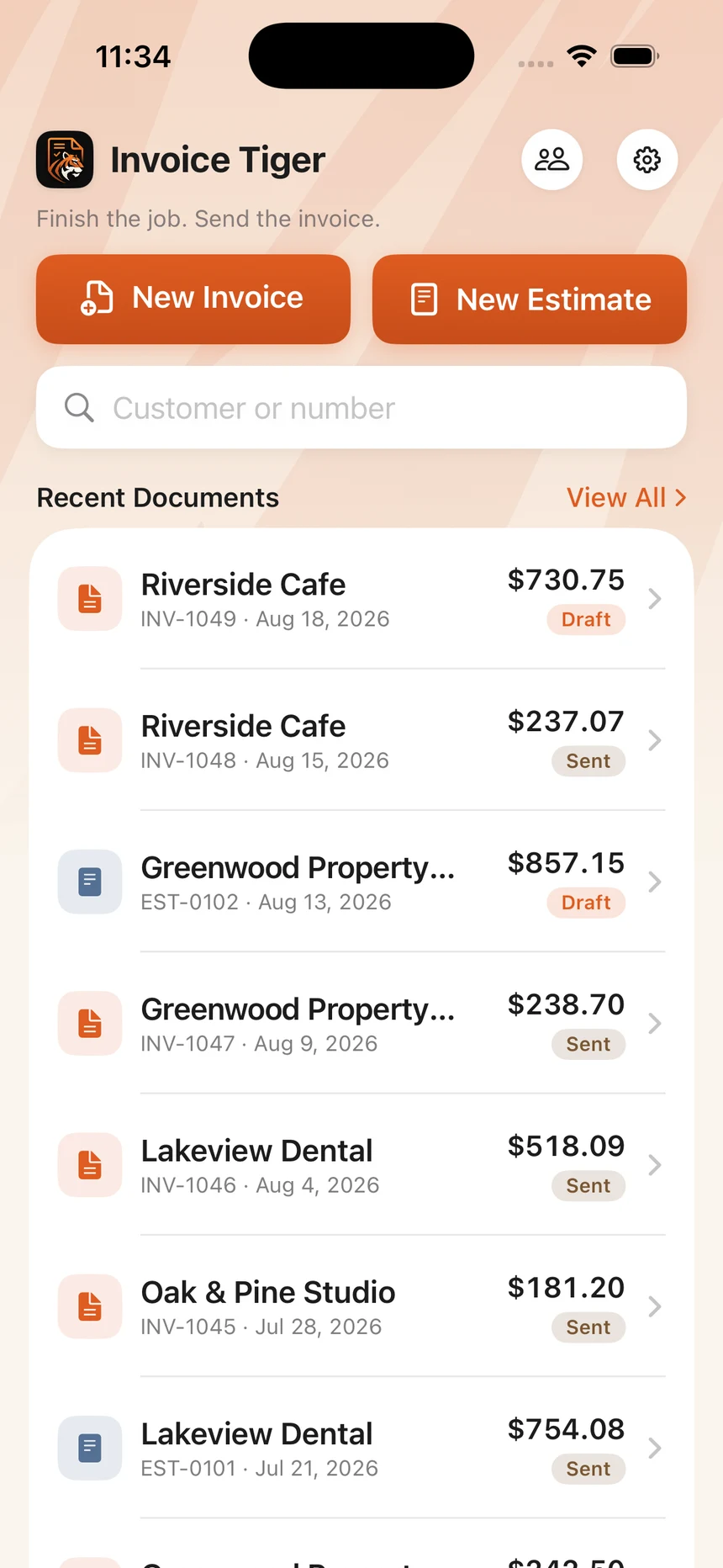
The whole idea
You don’t need accounting software to send an invoice.
Most invoicing tools are accounting platforms with an invoice feature attached. Before you can bill anyone, you are setting up a chart of accounts, connecting a bank feed, and deciding how you feel about accrual basis.
But a lot of independent work only ever needs three things:
- Select a customer
- Add what you did
- Send the invoice
Invoice Tiger is built around exactly that, and stops there. It makes the document and sends it.
How it works
Three steps. That’s the whole app.
Pick your customer
Invoice Tiger remembers everyone you have invoiced before. Choose a name, or add a new one in a few seconds.
Add the work
Services, quantities, prices, tax, notes, and your payment instructions. Totals update as you go.
Send it
Generate a polished PDF and share it however you already talk to your customer — mail, messages, whatever you use. Invoice sent. Claws crossed.
Features
Everything you need. Nothing you don’t.
Invoices in under a minute
Built around speed, not accounting workflows. Open the app, bill the job, close the app.
Estimates too
Quote the job first with the same lightweight workflow, then invoice it when the work is done.
Customers remembered
Enter someone once and reuse them forever. Repeat customers take one tap.
Professional PDFs
Clean, well-laid-out documents you will be comfortable sending to a client.
Everything on your iPhone
Search your whole history by customer or number. No web dashboard to log into.
Your records stay yours
Durable, exportable documents — not important paperwork locked behind an account.
Scope
Invoicing, and nothing else.
You don’t need payroll, inventory management, bank feeds, or a bookkeeping dashboard just to ask a customer to pay you. Invoice Tiger does that one part, and leaves the rest to the tools that are built for it.
What it does
- Invoices
- Estimates
- Saved customers
- Taxes and discounts
- Payment instructions
- PDF export and sharing
What it deliberately doesn’t
- Payroll
- Inventory management
- Bank feeds and reconciliation
- Bookkeeping dashboards
- Tax filing
- Fifteen setup screens
Why it exists
We read 5,443 invoice app reviews before deciding what to build.
They are public App Store reviews of eight invoicing apps. What follows is our own reading of them, not a survey and not anyone else vouching for us. The same two complaints kept surfacing across five different apps and more than seven years: the price or the monthly invoice cap, and invoices people had already sent going missing.
Neither is a hard problem. Both are choices. So we made different ones:
No monthly invoice counter
Nothing is tallied against a calendar and nothing resets on the first of the month. While you are subscribed, your documents are not counted at all.
Your records outlast the subscription
Everything stays on your iPhone and exports to a file you keep. An invoice you have already sent stays shareable whether or not you are still paying.
The full analysis is published, including the findings that are inconvenient for us and the two things a pile of reviews cannot tell you at all. Read what the reviews said, or the longer version of why there is no counter.
What it costs you per invoice
Keep what your customer pays you.
Invoice Tiger helps you create and send the invoice. It doesn’t route your customer’s payment, and it doesn’t take a percentage of anything you get paid.
You put your own payment instructions on the invoice — bank details, a payment app handle, “check on completion,” whatever you already use. Your customer pays you directly, the same way they always have.
A $2,400 invoice means $2,400 between you and your customer. Invoice Tiger is not in the middle of it.
Inside the beast
Built to be used standing up.
One-handed, on a job site, between appointments — wherever it is you actually finish the work.
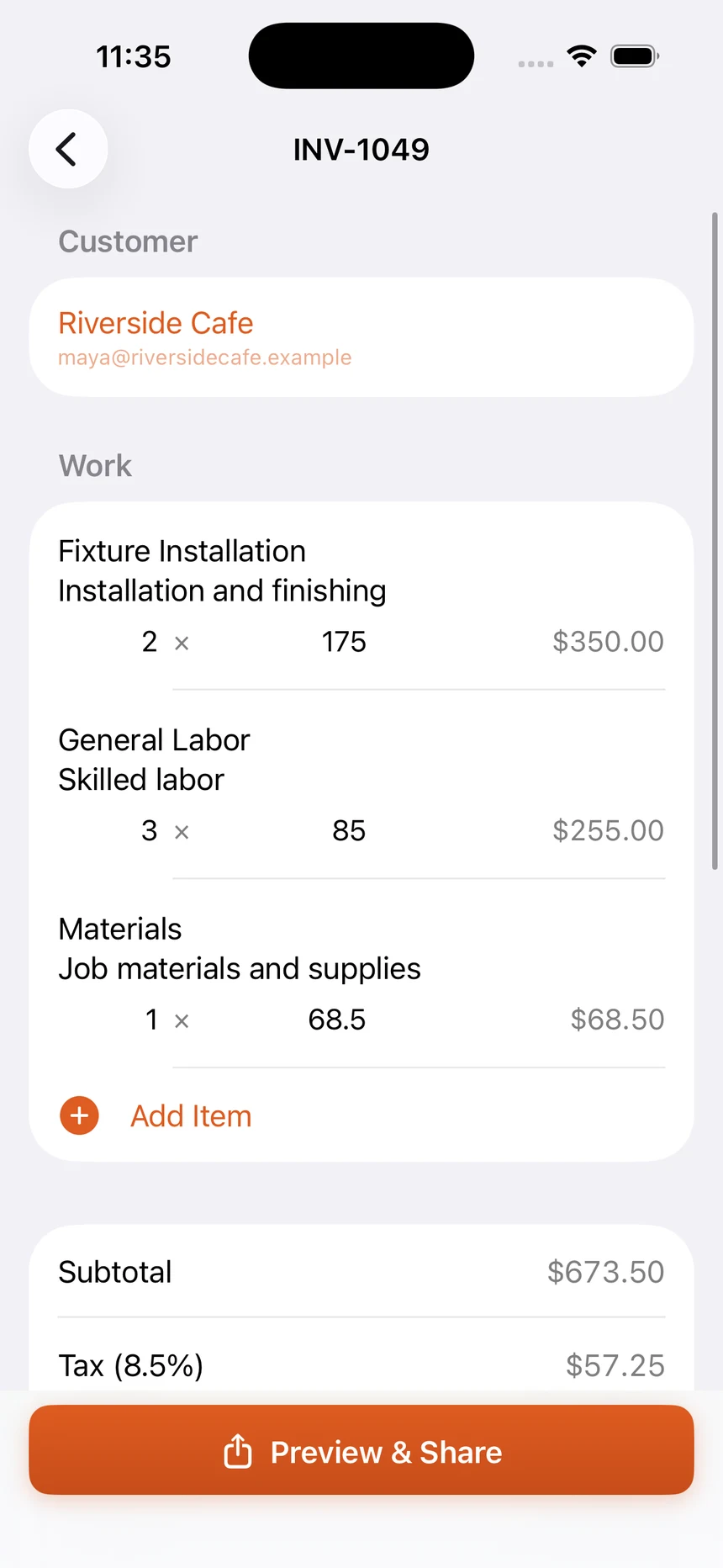
Create an invoice
Pick a customer, add line items with quantities and prices, apply tax or a discount, and you are done.
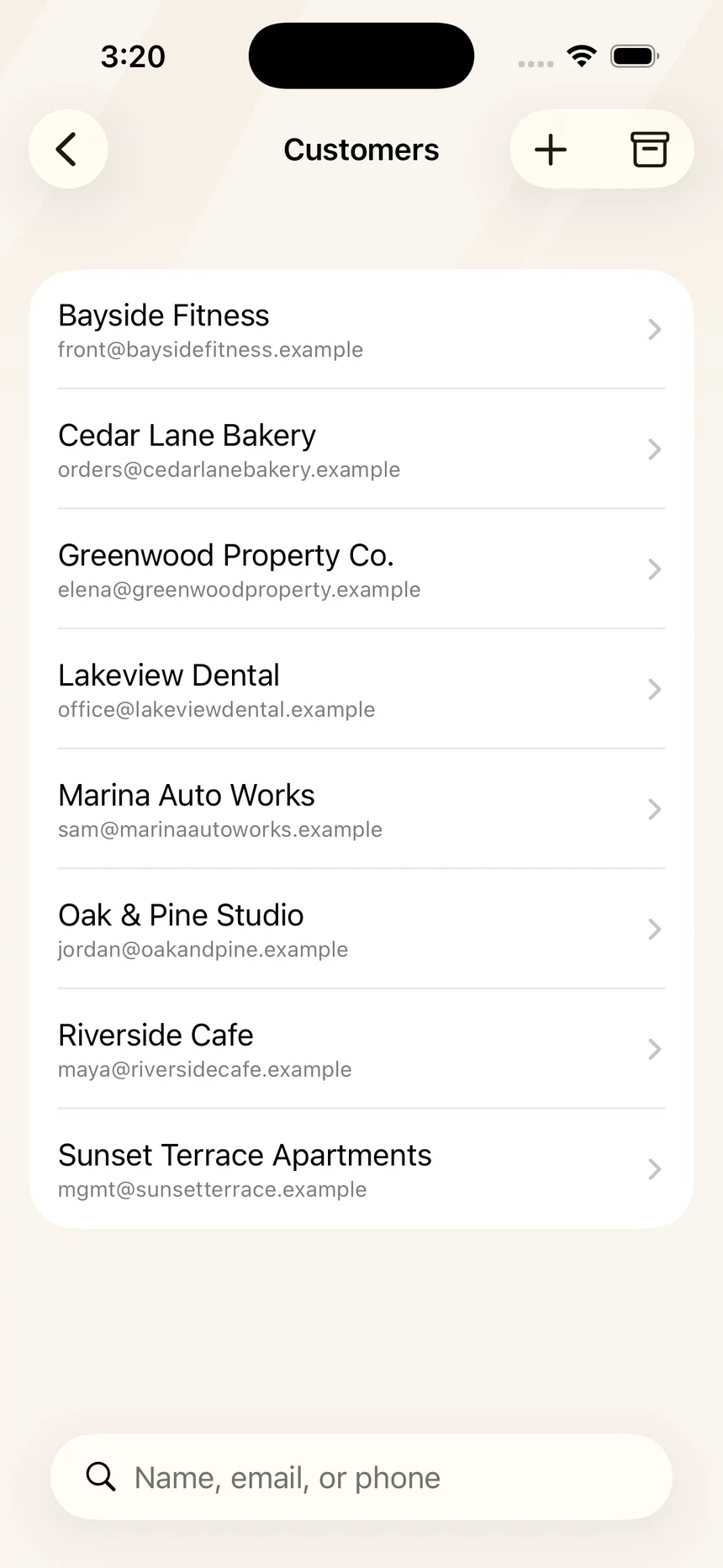
Saved customers
Everyone you have invoiced before is already there. Enter their details once and reuse them.
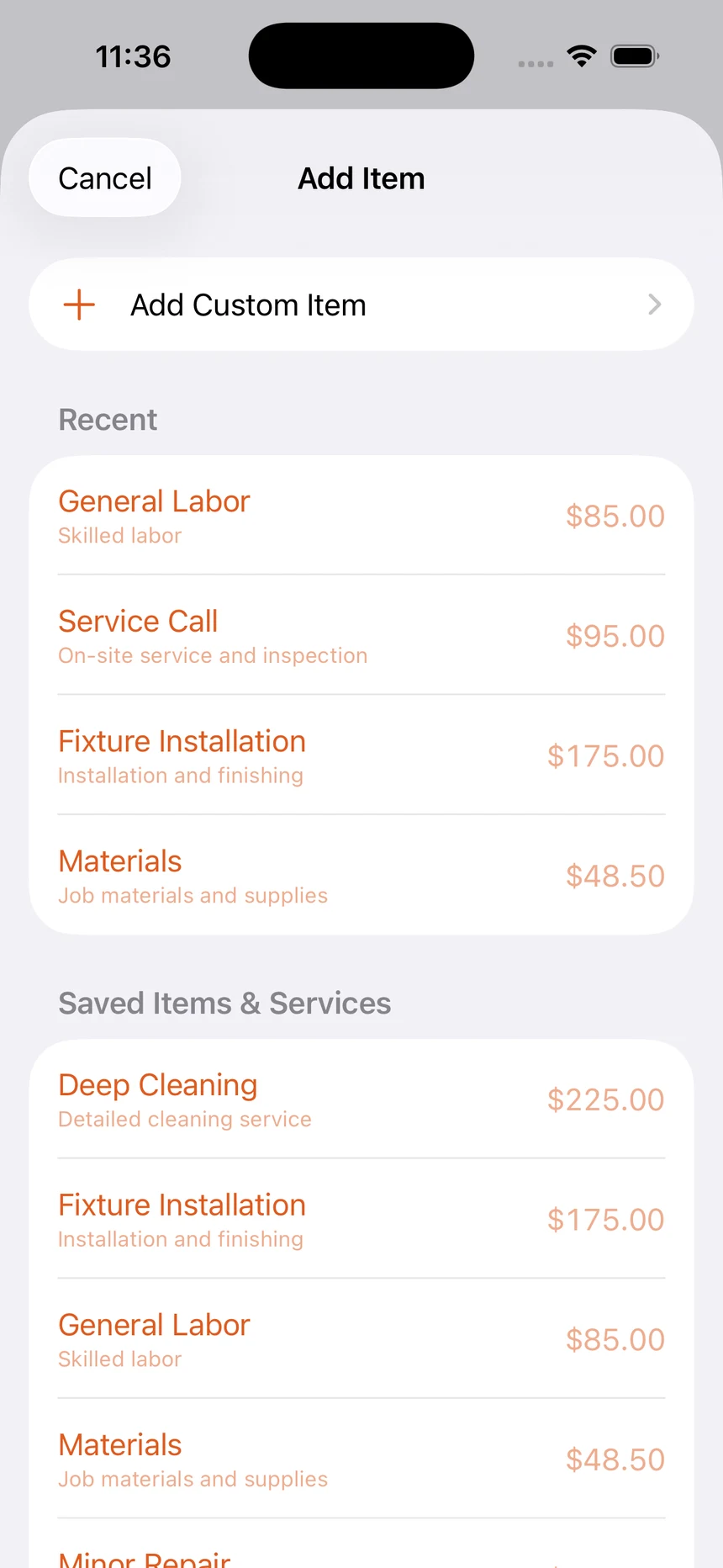
Saved items and services
The work you bill for again and again, saved with the price you usually charge. Adding a line becomes picking one.
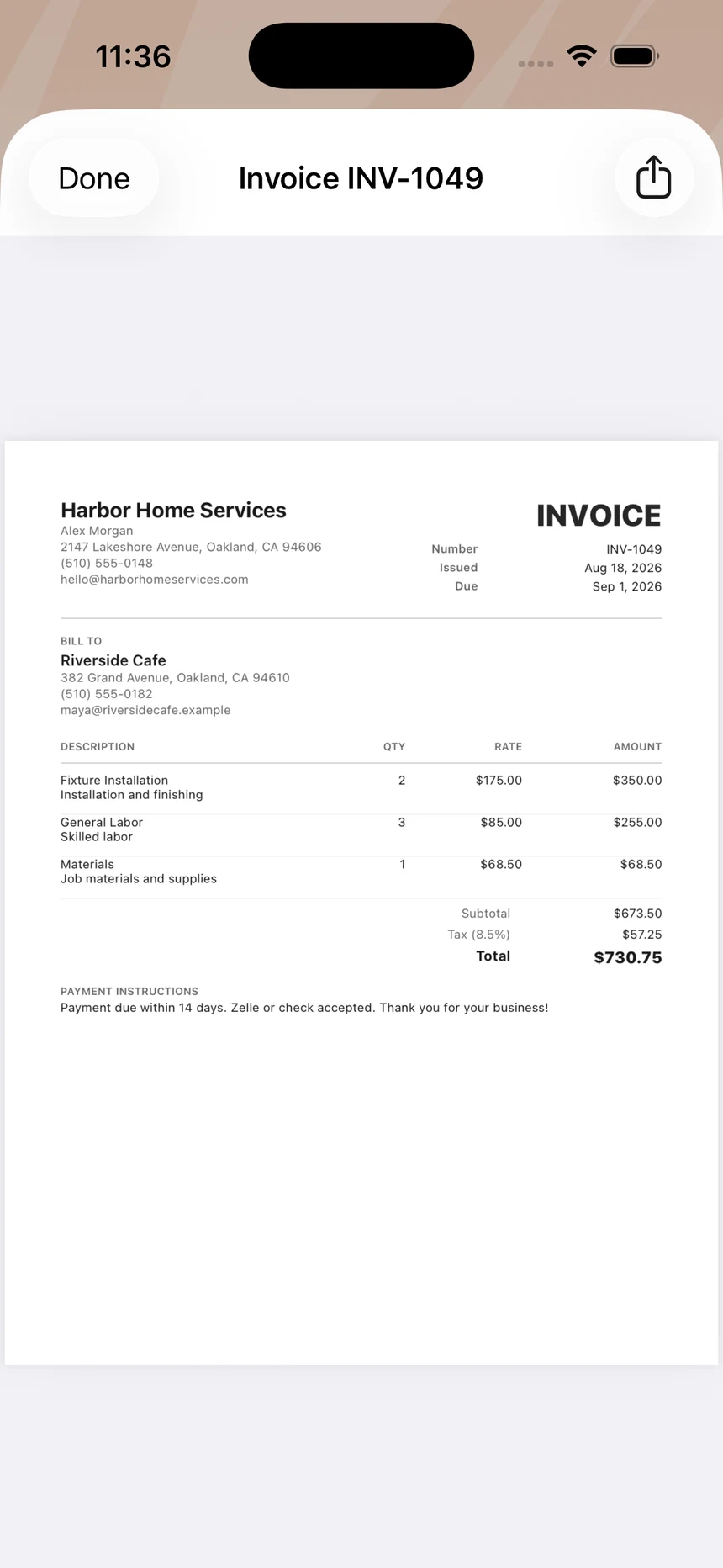
A finished PDF
Your business details, the work, the totals, and your payment instructions — laid out cleanly and ready to send.
First five sends free, then $5.99/mo or $49.99/yr
Who it’s for
Built for people who have actual work to do.
If invoicing is the admin at the end of your day rather than your day, this is aimed at you.
- Cleaners
- Contractors
- Photographers
- Tutors
- Consultants
- Coaches
- Freelancers
Plenty of people run a perfectly good business on a simple process. Not because accounting software is beyond them, but because it wouldn’t give them anything they need.
Ownership
Your invoices shouldn’t disappear because you stopped subscribing.
Invoice Tiger keeps your records on your iPhone. There is no account to create and no company server holding your customer list, so nothing has to be retrieved from anyone to look up an old job.
Your first five sends are free. That is five in total, and they do not refill at the start of the month. Once you subscribe, your documents are not counted at all. After that, sending new invoices requires a subscription — $5.99 a month or $49.99 a year. What you have already sent stays put either way:
They stay readable
Every invoice and estimate you have made stays on your phone, searchable by customer or number.
They stay shareable
Old documents still export as PDFs — useful when a customer asks for a copy of something from last year.
They stay yours
Export the whole lot — customers, invoices, estimates — to a file you keep, and import it back whenever you need to. The export is not behind the subscription.
Records move in as well as out. Coming from another invoicing app, your customers and your saved items import from a CSV, free — what moves when you switch covers what comes across and what does not.
Because everything lives on your device and nowhere else, we cannot recover it for you if the phone is lost. Run the export now and again and keep the file somewhere else. The privacy policy sets out what does and does not leave your phone.
Guides
Practical invoicing guides.
Straight answers for sending better invoices, without learning accounting software first.
- Make an invoice on iPhoneThe options that actually work on a phone, what each one costs you in time, and how to pick by how often you bill.
- What to include on an invoiceThe complete list, element by element — and a clear line between common practice and what the rules where you trade actually require.
- Invoice vs estimateTwo documents, two jobs. What each one is for, what changes between them, and why most service businesses need both.
- How to invoice for servicesHow to describe work someone cannot hold, price it in a way that survives questions, and send a bill that gets paid without a phone call.
Need an invoice right now?
Make one in your browser and download the PDF. No account, no email address, no watermark on the document.
FAQ
Questions worth asking first.
Do I need an account?
No. There is no sign-up, no password, and no web dashboard. Your customers, invoices, and estimates are stored on your iPhone, and the app works the first time you open it.
Can I create estimates?
Yes. Estimates work exactly like invoices and keep their own numbering, so you can quote a job first and invoice it later without learning a second workflow.
Does Invoice Tiger process customer payments?
No. Invoice Tiger creates the invoice and includes whatever payment instructions you want on it — bank details, a payment app handle, or “check on completion.” Your customer then pays you directly, the same way they do now.
Does Invoice Tiger take a percentage of payments?
No. Money never moves through Invoice Tiger, so there is no transaction for it to take a cut of. What your customer pays you is what you keep.
Is there a monthly limit on invoices?
No. Nothing is tallied against a calendar and nothing resets on the first of the month. While your subscription is active, invoices and estimates are not counted at all. Before you subscribe, your first five sends are free — five in total, and they do not refill.
What happens to my invoices if I cancel?
They stay on your phone. Documents you have already created remain readable, searchable, shareable, and exportable. What cancelling affects is sending new invoices — it does not touch the records you already have.
I am switching from another app. Do I have to retype everything?
No. Your customers and your saved items and services import from a CSV export, so the list you have built up comes with you. Invoice Simple’s customer and item exports are recognised automatically; a file from any other app goes through a mapping step where you match its columns once. You see a preview of every row before anything is saved, and duplicates are skipped.
Can I bring my old invoices across?
Partly, and it is worth being exact about it. Invoice history imports from Invoice Simple’s “Invoice Summary” export, and those arrive as read-only records — the number, dates, customer, and totals, searchable in your history alongside everything else. They are summaries rather than documents: there are no line items and no PDF, so an imported invoice is something you can look up, not something you can edit or re-send.
Can I export my records?
Yes. You can export everything — your business details, saved customers, and every invoice and estimate — to a single file you keep, and import it back later. Individual documents also export as PDFs.
Is Invoice Tiger accounting software?
No, and that is deliberate. It does invoices and estimates. It does not do bookkeeping, bank reconciliation, payroll, inventory, or tax filing. If you need those, you need a different kind of product.
Is it available on Android?
Not currently. Invoice Tiger is a native iPhone app and that is the only platform it runs on today.
What does Invoice Tiger cost?
$5.99 a month or $49.99 a year on the US App Store — Apple shows your own storefront's price. Your first five sends come before any of that, and there is no per-invoice charge and no monthly document counter. Invoice Tiger never takes a percentage of what your customers pay you.
Send the invoice. Go get ’em, tiger.
Professional invoicing without the accounting software.